
Scammers follow the money, and right now a lot of money moves through subscription platforms for creators. If you're a subscriber or someone managing a creator page, here's what matters most: verify you're on the real platform before you pay, treat unsolicited messages and links with suspicion, keep payment inside the platform's own system, and turn on two-factor authentication so a stolen password isn't enough to break into your account.
I'm not affiliated with OnlyFans or any other fan platform, and nothing here targets a specific account. This is general safety guidance built from patterns that show up repeatedly across the fan-platform world.
What Counts as a Fan Platform Scam
A fan platform scam tricks a subscriber or creator into handing over money, login details, or personal information by impersonating a real platform, creator, or support agent. The most common versions include phishing links disguised as login pages, impersonation accounts pretending to be known creators or platform support staff, requests to pay off-platform instead of through official checkout, "free access" offers that harvest data, and romance-style manipulation where someone builds a fake emotional connection before asking for money or gift cards. Each relies on the same core tactic: get you to act fast, outside the platform's normal safeguards, before you stop to verify.
This affects both sides of the transaction. Subscribers receive fake renewal notices and too-good-to-be-true offers. Creators get impersonated by fake managers, accounts offering promotion deals, and cloned profiles that siphon paying subscribers. Effective safety guidance covers both.
Step 1: Verify You're on the Real Platform Before You Pay
Before entering a card number or logging in, look at the actual address bar. Type the platform's domain yourself or use a saved bookmark instead of clicking a link from text, email, or direct message. Scammers build pixel-perfect copies of login pages; the URL itself is often the only reliable tell, sometimes off by a single letter or using an unfamiliar domain ending.
Three habits make this nearly automatic:
- Bookmark the official platform URL once and log in only from that bookmark.
- Never log in through a link sent to you, even if it appears to come from platform support.
- Double-check the domain character by character if something feels off, not just at a glance.
A creator comparison checklist can help you confirm you're looking at a real, consistent listing before you reach for your card.
Step 2: Scrutinize Unsolicited Messages and Links
An unsolicited direct message asking you to click a link, verify your account, or claim a reward relies on urgency. The message typically claims something needs immediate action: your account faces suspension, your subscription is about to lapse, or you've qualified for free content expiring in an hour.
Here's a quick check for any message like that:
| Signal | Legitimate platform behavior | Scam pattern |
|---|---|---|
| Who contacts you | Official notices appear inside the app or account dashboard | Random DM or email from an unfamiliar sender |
| Links | Rarely asks you to click an external link to "verify" | Pushes a shortened or unfamiliar link |
| Tone | Neutral, factual | Urgent, emotional, or threatening |
| Request | Never asks for your password | Asks you to "confirm" your login |
If you didn't initiate the contact, treat the link as a phishing attempt until proven otherwise. Hover over it on desktop or long-press on mobile to preview the destination before clicking.
Step 3: Keep Payment and Communication On-Platform
Any request to pay outside the platform's checkout - by gift card, wire transfer, cryptocurrency, or a personal payment app - is one of the clearest red flags in the fan-platform world. Legitimate platforms route payments through regulated processors specifically to protect both sides: receipts, dispute resolution, and in many cases the ability to request a chargeback if something goes wrong.
Once money leaves through an off-platform request, those protections disappear. A chargeback is a reversal of a card charge that your bank or card issuer processes on your behalf, and it generally applies only to payments made through a traceable, platform-recognized processor. Gift cards are the scammer's favorite tool precisely because they're nearly untraceable and cannot be reversed once the code changes hands. If anyone - a creator, manager, or fan - asks you to pay with a gift card or move payment outside the app, treat it as a scam attempt.
Step 4: Watch for Pressure Tactics and Urgency
Scammers rely on urgency because it short-circuits careful thinking. A message claiming you have ten minutes left on a deal, your account will be deleted today, or a limited free-access window closes tonight is designed to make you act before verifying anything.
Real platforms and creators rarely operate this way. Subscription renewals, content drops, and account notices typically give you time and don't threaten action within minutes. If a message pushes you toward a decision faster than feels reasonable, slow down on purpose. Close the message, open the platform through your bookmark, and check your account status there instead of trusting the claim.
Step 5: Check Profile and Listing Consistency
A listing inconsistency - mismatched photos, a bio that contradicts itself, a join date that doesn't line up with posting history, or pricing wildly different from what the same creator lists elsewhere - is worth pausing over. When comparing an unverified profile against one verified through a platform's confirmation process, the confirmed version tends to have a stable, consistent story, while a copycat often shows small seams upon close inspection.
Before you subscribe or message someone new, scan their profile for consistency the same way you'd check a secondhand listing before buying.
Step 6: Protect Your Personal and Financial Details
Never share your password, login code, or full card number with anyone, including someone claiming to be platform support. Legitimate support staff can help you through official channels without needing your password, and a one-time login code sent to your phone is meant for you alone. If someone asks you to read it aloud, that's a direct account takeover attempt.
Two-Factor Authentication as a Second Lock
Two-factor authentication adds a step beyond your password - usually a code sent to your phone or generated by an authenticator app - so a stolen password alone isn't sufficient to access your account. Turning it on is one of the highest-impact things you can do for account security.
Step 7: Research Before Committing to a New Creator or Service
Before subscribing to someone new or agreeing to a collaboration, spend a few minutes checking consistency across platforms where that creator is active. Do the bio, pricing, and content style match elsewhere? Does the account have a history, or is it brand new with no track record? A creator comparison checklist walks through specific checks worth running before you commit.
If you're a creator evaluating a directory yourself, check how that site's listing and recommendation process works before trusting it with your profile information.
Step 8: Report and Block Suspicious Accounts
Every major fan platform includes a reporting tool and block feature built into the account or message interface. Using both does two things: protects you immediately and feeds the platform's trust-and-safety systems information that helps catch repeat offenders. If you receive a phishing link, an off-platform payment request, or a message matching any pattern above, report the account through the platform's in-app reporting rather than just deleting the conversation.
Blocking stops further contact right away. Reporting creates a record that supports broader enforcement and, in cases involving financial loss, can support paperwork for a chargeback or report to a government agency.
Step 9: Build Ongoing Habits to Stay Scam-Resistant
Scam tactics evolve, but the habits that protect you remain consistent. Treat this as a short maintenance routine rather than a one-time fix.
- Use a unique password for every fan platform account, ideally generated and stored in a password manager.
- Turn on two-factor authentication everywhere it's offered.
- Keep your official platform bookmarks up to date and use them every time instead of searching or clicking links.
- Review your active subscriptions every few months to confirm you still recognize and want each one.
- If you're a creator, search your own name and content periodically to catch impersonation accounts early, and claim your profile on directories where you're listed so fans have one verified reference point.
Unverified Profile Patterns vs. Confirmed Profile Patterns
| Signal | Unverified profile | Confirmed/claimed profile |
|---|---|---|
| Consistency | Bio, pricing, or photos may not match other known accounts | Details stay consistent across platforms and over time |
| Account history | Often new, with little posting history | Established history with a visible timeline |
| Contact behavior | May push off-platform payment or urgent DMs | Keeps payment and communication inside the platform |
| Ownership | No confirmation the account belongs to the stated person | Owner has gone through a claim or confirmation process |
Scam Red-Flag Checklist
Run through this before you pay, message, or click anything that feels slightly off:
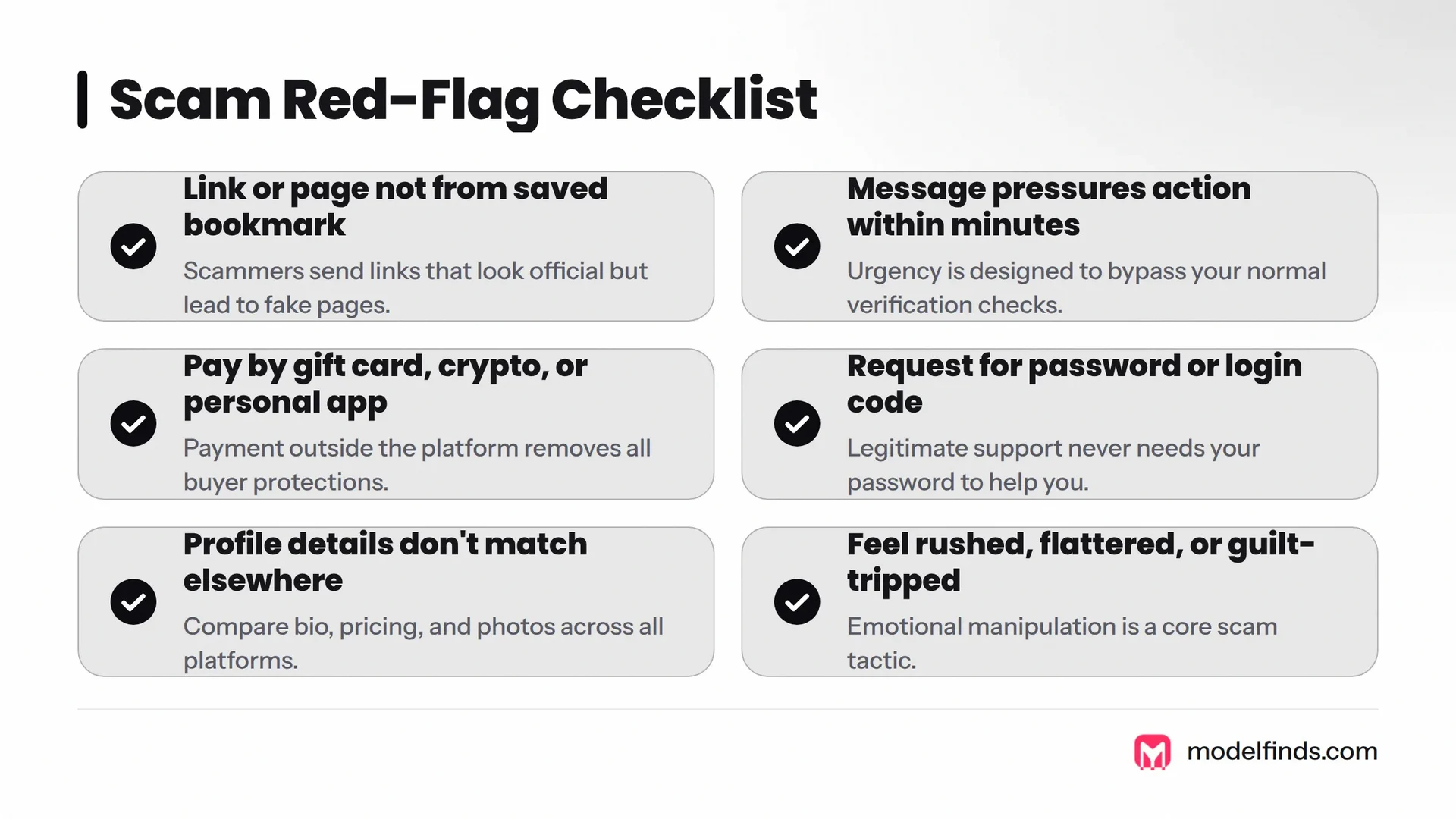
- The link or page didn't come from a bookmark you saved yourself.
- The message pressures you to act within minutes or hours.
- You're asked to pay by gift card, crypto, or a personal payment app instead of the platform's checkout.
- Someone asks for your password, login code, or full card number.
- A profile's bio, pricing, or photos don't match what's listed elsewhere for the same person.
- A "free access" offer asks for payment details upfront "just to verify."
- The conversation moves quickly toward emotional intimacy before money is mentioned.
- The account is brand new with no consistent posting history.
- You feel rushed, flattered, or guilt-tripped into skipping your normal checks.
What to Do If You Already Paid a Scammer
Act fast and work through these steps in order:
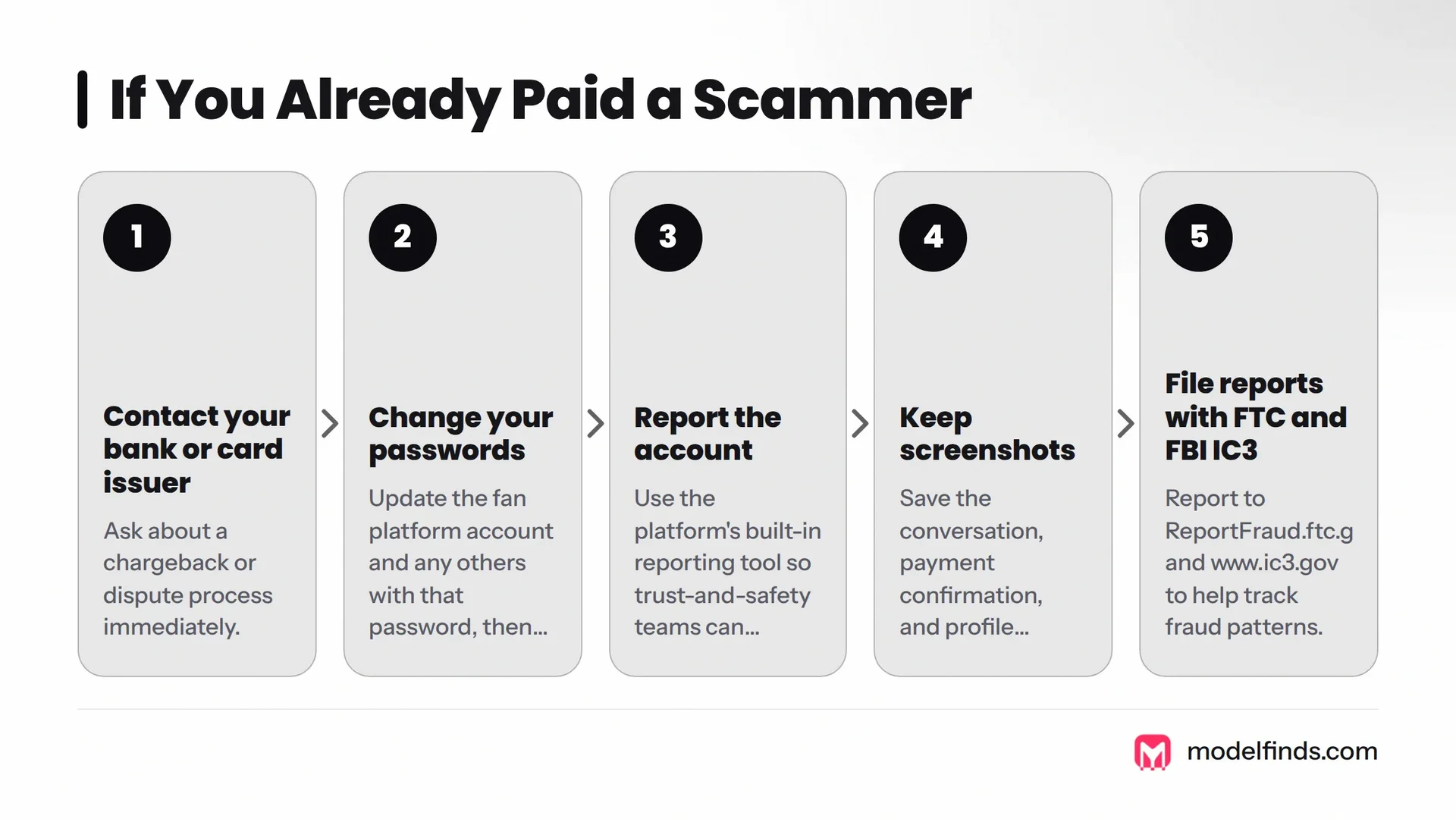
- Contact your bank or card issuer immediately and explain that you believe the charge is fraudulent; ask about a chargeback or dispute process.
- Change your passwords on the fan platform account and anywhere else you reused that password, then turn on two-factor authentication if you haven't already.
- Report the account through the platform's built-in reporting tool so trust-and-safety teams can investigate.
- Keep screenshots of the conversation, payment confirmation, and profile before you block or the account disappears; you'll need them for your bank, the platform, and any government report.
- Report the fraud to the Federal Trade Commission at ReportFraud.ftc.gov and, for internet-based crimes, to the FBI's Internet Crime Complaint Center (IC3). The FTC notes that consumers reported losing more than $12.5 billion to fraud in 2024, a reminder that reporting matters even when recovery isn't guaranteed.
Don't send any more money to try to fix the situation, and don't engage further with the scammer, even to express anger. Scammers sometimes use continued contact as an opening to run a second scam, like offering fake recovery services for a fee.
Frequently Asked Questions
What is the most common fan platform scam? Phishing is the most common pattern: a fake login page or an unsolicited direct message designed to steal your password or trick you into an off-platform payment.
What if I already paid a scammer? Contact your bank or card issuer right away to ask about a chargeback, change your passwords, report the account through the platform's reporting tool, keep screenshots of everything, and file a report with the FTC and IC3.
How do I know if a fan platform login page is fake? Check the URL character by character against your saved bookmark. A fake page often uses a slightly altered domain, a different ending, or extra words, and it usually arrives via a link in a message rather than one you typed yourself.
Why do scammers ask you to pay off-platform? Paying outside the platform's checkout removes the payment processor's protections, including the ability to dispute the charge or request a chargeback, which makes the money far harder to recover.
What does it mean when a message creates urgency or pressure? It's a manipulation tactic meant to rush you past your normal judgment. Legitimate renewals, offers, and account notices rarely demand action within minutes.
How can I tell if a creator's profile listing is inconsistent or suspicious? Compare the bio, pricing, and photos against other places that creator is active. Mismatches, a brand-new account with no history, or pricing that's far out of line with similar listings are worth a second look.
What is a chargeback and how does it help if I was scammed? A chargeback is a reversal of a card payment that your bank or card issuer processes on your behalf, generally available only for payments made through a traceable, legitimate payment processor rather than a gift card or wire transfer.
What is a romance scam in the context of fan platforms? It's when someone builds a fake emotional connection, often posing as a creator or an interested fan, specifically to manipulate the other person into sending money, gift cards, or personal information.
What is a gift card scam and why do scammers prefer it? A gift card scam asks the victim to buy gift cards and hand over the codes as payment. Scammers favor this method because gift card codes are nearly impossible to trace or reverse once they're redeemed.
How does two-factor authentication help protect my fan platform account? It requires a second proof of identity, usually a code sent to your phone, beyond just your password, so a stolen password alone isn't enough for someone to log in as you.
Should I ever share my password or login code with anyone? No. Legitimate platform support never needs your password or your one-time login code to help you.
How do creators avoid impersonation scams? Search your own name periodically to spot cloned accounts early, keep your official profiles consistent and up to date, and claim your listings on directories so fans have a confirmed reference point.
A Quick Note Before You Go
None of this requires technical skill, just a habit of slowing down before you pay, click, or log in. If a listing still feels off after running through this checklist, trust that instinct. It's usually right.