
Looking for a way to preview a creator's content before paying full price? OnlyFans free trials exist, but they work differently than you might expect. They're not a platform-wide feature - each creator decides whether to offer one, on what terms, and for how long. The key to using one safely is knowing where to find legitimate offers, understanding what you're signing up for, and tracking when the trial ends so you're not hit with an unexpected charge.
Here's what you need to do: find a creator currently offering a trial, check the offer directly on the creator's profile, confirm your payment method on file, note the exact expiration date, and set a reminder before billing begins. That last step prevents the most common frustration with free trials across any platform.
What OnlyFans Free Trials Actually Are
An OnlyFans free trial is temporary access to a subscription you'd normally pay for each month. The creator controls everything: trial length, which content you can see, and whether a payment method is required upfront. Some run for three days, others for a week or longer. There's no fixed platform rule about duration.
The biggest misunderstanding: this isn't a universal account feature available to everyone. It's purely optional, decided by each creator individually, and can be turned on or off whenever they choose. OnlyFans' Help Center explains how creators manage subscription pricing and promotional offers, and free trials aren't listed as something every creator must provide.
The basic mechanics are simple: a trial gives you free access for a set period, usually with your payment method attached so the subscription renews automatically when the trial expires - unless you cancel first.
Step 1: Locate Creators Offering Free Trials
Trial offers typically appear in a few predictable spots:
- Creator bios or pinned posts that mention a current promotional offer
- Third-party directories or listing sites that mention a current trial
- Social media announcements where creators promote time-limited trials to followers
The challenge: trial availability shifts constantly. A creator might run a three-day trial this week and remove it next week. Always treat any trial mention as a lead, not a guarantee. Before taking any action, check the creator's profile directly for the current, actual offer.
Step 2: Verify the Trial Offer Before You Act
Most guides skip this step, and it's the one that saves you from broken links or outdated information.
Offers expire, creators change terms, and listings can fall out of date by hours. Always visit the creator's profile directly before entering any payment information.
Run through this quick checklist before you do anything:
- The trial end date or duration is clearly stated on the creator's profile, not vaguely mentioned
- You know whether a payment method is needed immediately or only after the free period ends
- You've checked the creator's actual profile, not just a third-party reference to the offer
- You're willing to pay the full subscription price once the trial converts
Step 3: Activate the Trial on the Creator's Profile
Once you've found and confirmed a trial offer, activation typically follows this path:
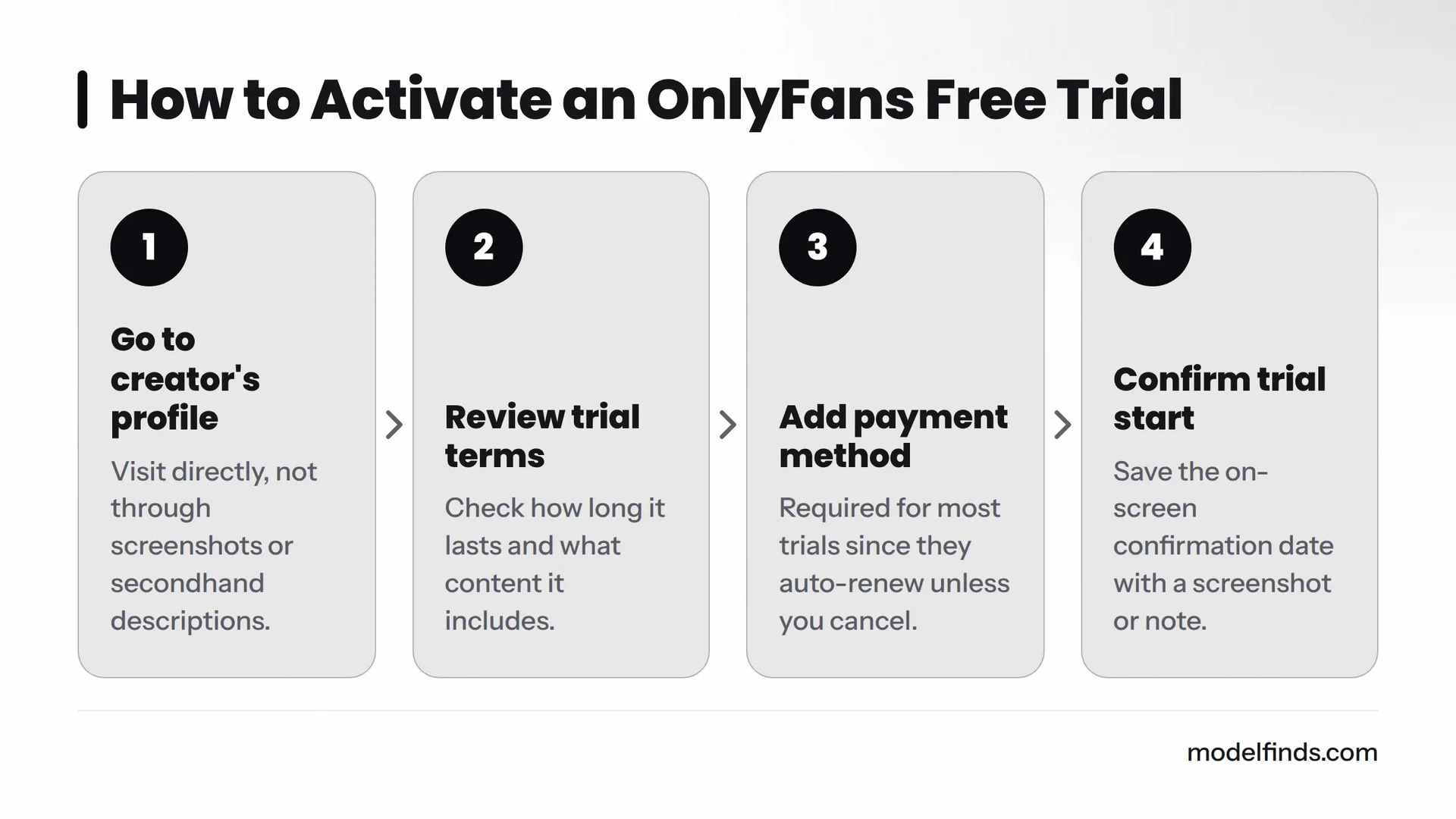
- Go to the creator's profile directly, not through a screenshot or secondhand description
- Review the trial terms: how long it lasts and what content it includes
- Add a payment method if required - this is normal for subscription trials, since they convert to paid plans automatically unless you cancel
- Confirm the trial start and save the on-screen confirmation date
Document when you start. A screenshot, a calendar entry, or a note in your phone works fine. You'll need the exact dates later.
Step 4: Understand What the Trial Includes
Free trial access isn't always full access. Depending on how a creator structured their account, a trial might:
- Include the main feed but exclude pay-per-view posts or premium bundles
Every creator's pricing structure is different, so trial scope varies.
Step 5: Mark Your Calendar Before the Charge Hits
This single step prevents the most common complaint about free trials: an unexpected renewal charge.
Here's how it works. Most subscription trials use auto-renewal: once the trial ends, the subscription charges your payment method automatically at the regular price, unless you cancel first. If you don't cancel before the deadline, a charge is the default outcome.
Protect yourself with these practical steps:
- Write down the exact expiration date, not just "a few days from now"
- Set a phone or calendar reminder 24 to 48 hours before that date
- Check your account's billing settings to see what the auto-renewal toggle is currently set to
- Decide in advance whether you want to let it renew or cancel
No guide can guarantee that a trial won't auto-renew - that depends on your account settings and what you do before the deadline. The reminder is essential.
Step 6: Decide Whether to Keep or Cancel
When the trial period is ending, you have two choices:
- Keep the subscription: Do nothing, and it renews at the regular price
- Cancel: Stop it before the expiration date
How Trials Differ From Other Offers
Free trials often get mixed up with similar-sounding offers. Here's the distinction:
| Offer Type | What It Is | Duration |
|---|---|---|
| Free trial | Temporary free access to a normally paid subscription, created by one creator | Days to a few weeks |
| Free subscription | A creator whose subscription is free rather than paid; read how free subscriptions work | Ongoing, no expiration |
| Creator promotion | A discount, bundle, or lower-priced offer instead of fully free access | Varies |
| Trial trap | A misleading offer designed to generate charges after the free period | Varies |
Keeping these categories separate prevents confusion when you're scanning a creator's bio or a directory for the word "free."
Frequently Asked Questions
Will I be charged after a free trial ends?
In most cases, yes, unless you cancel before the trial expires. Free trials typically auto-renew using the payment method you provided at signup, so a charge at the full subscription price is the default.
Do all creators offer free trials?
No. Free trials are entirely optional and set by each creator individually. Many never run one, and those who do can start or stop the offer at any time.
How long does an OnlyFans free trial usually last?
Creators set their own durations, commonly ranging from a few days to a couple of weeks. Always confirm the specific length on the creator's profile before activating.
What's the difference between a free trial and a free subscription?
A free trial is temporary and attached to a normally paid subscription that charges you unless you cancel. A free subscription is ongoing, with no expiration, because the creator charges nothing for it.
Can I cancel a trial early without being charged?
Generally yes, if you cancel before the trial's billing date.
Where do I find legitimate free trial offers?
Start with the creator's own profile for current terms. Use directories only as a starting point to discover offers.
About ModelFinds and This Guide
ModelFinds is an independent directory not affiliated with OnlyFans. Offer terms change quickly. Nothing here guarantees that any specific trial is active or that a particular account won't auto-renew. The creator's own profile page is always the final source on current terms.